Page 2 of 3
Re: F1 Computer Photo Graphics and Illustration
Posted: 06 Aug 2009, 23:22
by modbaraban
Can't choose among 2nd and 3rd. =D>
Re: F1 Computer Photo Graphics and Illustration
Posted: 07 Aug 2009, 00:08
by Scotracer
Carlos wrote:
It's a project I've been working on for the last year. So I'm kind of quiet about the tools I use. Thanks though, your interest is a compliment.

modbaraban; which version of Senna looks best to you?
#1 looks better to me

Re: F1 Computer Photo Graphics and Illustration
Posted: 07 Aug 2009, 01:30
by Giblet
They all look good, but scream "photoshop filter" from a mile away (sorry for my blunt critique, but to each his/her own).
This pic is not racing, but it is the best picture I have taken. This is all natural light, no major touching done at all. What could you do with this Carlos, as I want to print it and frame it, but I think it may lose it's luminescence when printed.
It's on Picasa, so I can't post it in this message, but here is the link
http://picasaweb.google.com/Gibletoid/B ... 8237493394
Feel free to browse the albums, but they are boring. "Arm" and "Finger" are my epic injury pics. They are only for the strongest of stomachs.
Re: F1 Computer Photo Graphics and Illustration
Posted: 07 Aug 2009, 04:07
by Carlos
Yes, 2&3; thanks Scotracer; modbaraban. I could combine both for an average of what is best in each. Sure Giblet, it's all 'photoshop' filters and algorithms: levers, pullies, chains and sliders ... it all depends on the internal grace of the operator. Although I would prefer it murmurs "photoshop filters" instead of screech. No offence could be taken, it gives me something to work on.
Probably somebody could tweak that a bit. The first 2 photos in the thread are examples of tonemapping. I couldn't do anything to improve that photo. It could be put through some high dynamic range synth-filter, but maybe not to it's improvement: read this, it has some photo techniques that are related to long exposures.
http://en.wikipedia.org/wiki/HDR_photography
Most digital cameras can be programmed to take a burst-series of several frames, at several exposures, then HDR puts them in a pile so you can see everything from all the exposures, but you have to read the camera manual.

The Arm series - what brilliant medical service, technique and care you received. Over the next few days I'll remember to tell people there are a few very good things about our health care system. There's some excellent work being done for people.

Sir Jackie Stewart - Triple WDC
Re: F1 Computer Photo Graphics and Illustration
Posted: 07 Aug 2009, 07:00
by modbaraban
Giblet wrote:They all look good, but scream "photoshop filter" from a mile away
Jimi Hendrix screamed "electricity". Does that mean he couldn't play?

Re: F1 Computer Photo Graphics and Illustration
Posted: 11 Aug 2009, 17:47
by jon-mullen
modbaraban wrote:Giblet wrote:They all look good, but scream "photoshop filter" from a mile away
Jimi Hendrix screamed "electricity". Does that mean he couldn't play?
Lennon screamed "I got blisters on me fingers!" and he played plenty well anyway.
Hard to improve on this one, but I had Photoshop open for work anyway:

Re: F1 Computer Photo Graphics and Illustration
Posted: 12 Aug 2009, 23:10
by Carlos
jon-mullen - I like the grained and light technique of isolating the BRM in the foreground. It's very emphatic.
Another of Senna. Trying to make a more subtle painterly print.

Edit: Yes mx_tifosi; that should be enough to satisfy most Senna fans
Re: F1 Computer Photo Graphics and Illustration
Posted: 12 Aug 2009, 23:28
by mx_tifoso
Enjoying everything thus far, but...
No more Senna please?

Re: F1 Computer Photo Graphics and Illustration
Posted: 13 Aug 2009, 00:13
by czt
jon-mullen wrote:
Lennon screamed "I got blisters on me fingers!" and he played plenty well anyway.
Hard to improve on this one, but I had Photoshop open for work anyway:
I really like that one!!
Re: F1 Computer Photo Graphics and Illustration
Posted: 13 Aug 2009, 00:58
by Giblet
modbaraban wrote:Giblet wrote:They all look good, but scream "photoshop filter" from a mile away
Jimi Hendrix screamed "electricity". Does that mean he couldn't play?
Bad analogy.
Anyone can load photoshop, load a picture, and apply a filter. I understand that there is more to these shots, but like I stated, _anyone_ can do it.
If you have never played a guitar before, and picked it up with the signal dripping in beautiful distortion, you could not produce good output.
The last shot of the airborne car to me is good use of filters and photoshop math. Giving the car the blur and softness and making the background all ahrd and stippled is to me art. It took an eye to do, and you can see the human involvement.
However, to me, taking an existing shot and trying to make it look 'painted' or 'brushed', that is what I say looks like a filter.
Re: F1 Computer Photo Graphics and Illustration
Posted: 13 Aug 2009, 01:04
by Giblet
Carlos wrote:Yes, 2&3; thanks Scotracer; modbaraban. I could combine both for an average of what is best in each. Sure Giblet, it's all 'photoshop' filters and algorithms: levers, pullies, chains and sliders ... it all depends on the internal grace of the operator. Although I would prefer it murmurs "photoshop filters" instead of screech. No offence could be taken, it gives me something to work on.
Probably somebody could tweak that a bit. The first 2 photos in the thread are examples of tonemapping. I couldn't do anything to improve that photo. It could be put through some high dynamic range synth-filter, but maybe not to it's improvement: read this, it has some photo techniques that are related to long exposures.
http://en.wikipedia.org/wiki/HDR_photography
Most digital cameras can be programmed to take a burst-series of several frames, at several exposures, then HDR puts them in a pile so you can see everything from all the exposures, but you have to read the camera manual.
The Arm series - what brilliant medical service, technique and care you received. Over the next few days I'll remember to tell people there are a few very good things about our health care system. There's some excellent work being done for people.
Sir Jackie Stewart - Triple WDC
Tks for the input Carlos.
I've seen a lot of HDR, and tried a few shots myself, but it is the 'technique de jour' on the internet right now, and we've been inundated with HDR and HDRish looking shots.
Same goes for tilt-shift shots.
I'd love to see a tilt-shift of Monaco. Tilt-shift is the lens art of making something big look like it's in a shoe box. examples:

real beach
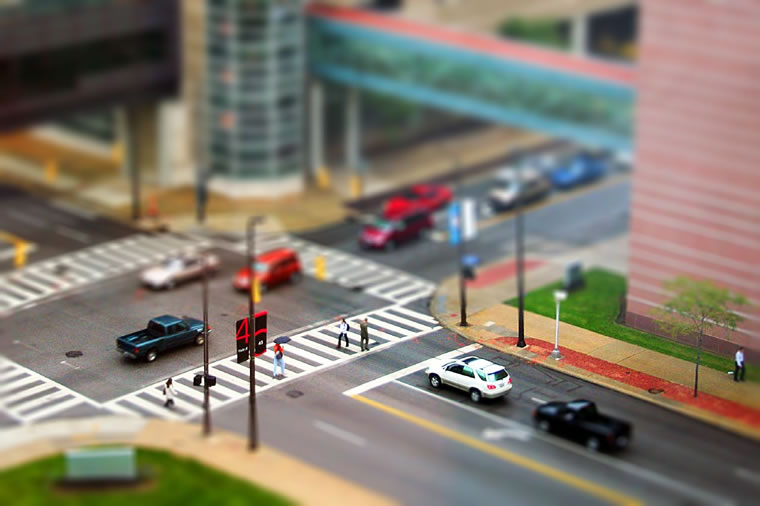
real street corner.
Re: F1 Computer Photo Graphics and Illustration
Posted: 13 Aug 2009, 05:54
by Carlos
Sure Giblet and it reminds me of the 100 year plus and counting squabble between/of painting VS photography, photos being made by button pushing and chemicals, now we can add computerization approximating painting. I have a digital library of over 3000 distinctive brush strokes. Interestingly a lot of the computer filters are derived from space based spy photography processing, it's all incestuous. Machine vision is fascinating. One of my program's math routines are also used in English Post offices so clerks can help the mute by video, image/character analysis of sign language in real time. Fascinating.
Here's some machine vision resources:
http://iris.usc.edu/Information/Iris-Conferences.html
Tilt-shift photography - lots on special lens a resource rich link:
http://hame.ca/tiltshift.htm
It can be simulated in Photoshop, here's a tutorial
http://www.tiltshiftphotography.net/pho ... torial.php
This is interesting too:
http://copyfight.corante.com/archives/2 ... graphy.php
Using photoshop to simulate tilt-shift photography sounds a little similar to using software for paint effects - my grandfather had a saying ' What you lose in the swings you gain in the round abouts' Today we say 'what it is - is what it is' circular logic, Catch 22 - maybe the result is what is important, is of value or pleasure. Enjoy.
Re: F1 Computer Photo Graphics and Illustration
Posted: 13 Aug 2009, 15:27
by Giblet
I can't remember the name, but there is a term for the look things have when out of focus through a lens.
It's something that can't be completely done in a photoshop tilt shift simulation, as when you shoot with a real lens, the out of focus parts look different and can't be properly simulated.
I'll try to find the name of the term, but dollars to donuts as we say in Canada (oops I mean doughnuts), you'll likely beat me to the punch.
Re: F1 Computer Photo Graphics and Illustration
Posted: 13 Aug 2009, 16:22
by Carlos
Actually it is rumoured we use doughnuts for currency here is Canada, stringing them on twine and wearing them as a sort of neckpiece - that may have been where the proverb 'dollars to doughnuts' originated - but we both know that we don't and that it's not true. Doughnuts are iconic bakegoods
It might or might not be Gaussian focus; just a guess:
http://en.wikipedia.org/wiki/Gaussian_blur
Because a Gaussian filter is a mathematical expression of a sort of average:
http://en.wikipedia.org/wiki/Gaussian_filter
I may be able to find it fast but I suspect most on the forum can actually do the formulae in the links
Re: F1 Computer Photo Graphics and Illustration
Posted: 13 Aug 2009, 20:34
by Giblet
Vancouverite here. Kind of Canadian but a whole different country at the same time.
The term I am seeking is a photographic term predating mathematical filters.
When back home and off the iPhone I think I know where to find it.