Page 20 of 91
Re: [MVRC] Mantium Virtual Racecar Challenge 2016
Posted: 11 Sep 2016, 18:15
by LVDH
CAEdevice wrote:I was wondering if the reports are generated using Paraview and surfaceLIC: I am still having problems with SurfaceLic and the latest release of Paraview. I would try with an older release, but before unistalling I would like to be sure that ising a "decomposed" case is not related with surfaceLIC crash.
Another point is: wich is the difference between "MPI" and "not MPI" release of Paraview?
SurfaceLIC depends on the version not on decomposed or not.
At least on Linux you can start Paraview with MPI it is then often much faster as it uses more CPU cores. Should be the same on Windows.
variante wrote:Does anybody know how to produce, in Paraview, streamlines on the surface of the car?? ...and velocity field as well
Setting the "velocity" parameter directly on the car surface produces a uniform "zero velocity" surface (as it should be); also, the surface streamlines are not the required ones.
Offsetting the surface of the car by a few mm (or by a few mesh cells) should do the job, but I don't know how to do that in Paraview.
Check the Motorbike tutorial in OF. You have to create a near wall velocity field first. You can then in OF use that for surface stream lines. But you can also use that near wall velocity field in Paraview together with surfaceLIC.
Alonso Fan wrote:compliance check complete, only a couple of minor issues. waiting for the numbers now!

I know your numbers and I can tell you that you really need to learn patience. But as all the hard work is done you can be sure that the results will be released ahead of time.
Re: [MVRC] Mantium Virtual Racecar Challenge 2016
Posted: 11 Sep 2016, 23:50
by Alonso Fan
LVDH wrote:
...I can tell you that you really need to learn patience...
Sorry, its my first proper race and I'm really excited. I'm not expecting much though
Re: [MVRC] Mantium Virtual Racecar Challenge 2016
Posted: 12 Sep 2016, 20:10
by CAEdevice
LVDH wrote:
SurfaceLIC depends on the version not on decomposed or not.
I confirm: surfaceLIC works after downgrading Paraview to 3.98.1
Re: [MVRC] Mantium Virtual Racecar Challenge 2016
Posted: 12 Sep 2016, 20:21
by RicME85
I think that's the version I always used for SurfaceLIC, all the others crashed
Re: [MVRC] Mantium Virtual Racecar Challenge 2016
Posted: 13 Sep 2016, 11:56
by RicME85
Right, so Im sat here contemplating a car for the next race.
I liked the intro class we had in KVRC 2016 as it kept things nice and simple.
Because of this, this is the first time I have looked at the HX part of the rules.
Each planar shape must be at least 180,000mm2 in area.
Am I reading it right? The face has to be that large before extruding 100mm?
Re: [MVRC] Mantium Virtual Racecar Challenge 2016
Posted: 13 Sep 2016, 12:04
by LVDH
RicME85 wrote:Right, so Im sat here contemplating a car for the next race.
I liked the intro class we had in KVRC 2016 as it kept things nice and simple.
Because of this, this is the first time I have looked at the HX part of the rules.
Each planar shape must be at least 180,000mm2 in area.
Am I reading it right? The face has to be that large before extruding 100mm?
Yes, you create a face with a minimum of 180,000mm2 then you project it 100mm directly in X-direction.
Maybe a word of advice. I think every car stuck to the 180,000mm2, yet most cars did not achieve the cooling targets. So you can either design better ducts or increase the size of the heat exchanger as the rules only stipulate a minimum size.
Re: [MVRC] Mantium Virtual Racecar Challenge 2016
Posted: 13 Sep 2016, 13:46
by CAEdevice
RicME85 wrote:Right, so Im sat here contemplating a car for the next race.
I liked the intro class we had in KVRC 2016 as it kept things nice and simple.
Because of this, this is the first time I have looked at the HX part of the rules.
Each planar shape must be at least 180,000mm2 in area.
Am I reading it right? The face has to be that large before extruding 100mm?

Re: [MVRC] Mantium Virtual Racecar Challenge 2016
Posted: 13 Sep 2016, 14:07
by RicME85
Cheers Matteo. I was lookin to retro fit it into the the intro class body. Was a little shocked at how much space it took up so wanted to clarify
Re: [MVRC] Mantium Virtual Racecar Challenge 2016
Posted: 14 Sep 2016, 02:48
by etsmc
can someone explain the results from mantiumFlow?
really just the Cm, is this center of pressure?
I get the Cl, Cd, and Clf, Clr but id Cm is not the center of pressure how do I work this out?
also the flow for the inlet and outlets how do I make this have meaning? how do I convert the U=(numbers) to flow in I guess m/s
Another thing to add on is that once the simulation has finished how do i see the result in paraview? i can open the case.foam file but nothing shows up the box that is the wind tunnel appears to be empty.
Thanks
Re: [MVRC] Mantium Virtual Racecar Challenge 2016
Posted: 14 Sep 2016, 09:28
by LVDH
etsmc wrote:can someone explain the results from mantiumFlow?
really just the Cm, is this center of pressure?
I get the Cl, Cd, and Clf, Clr but id Cm is not the center of pressure how do I work this out?
also the flow for the inlet and outlets how do I make this have meaning? how do I convert the U=(numbers) to flow in I guess m/s
Another thing to add on is that once the simulation has finished how do i see the result in paraview? i can open the case.foam file but nothing shows up the box that is the wind tunnel appears to be empty.
Thanks
Hi,
have a look at the README you also have a post-processing tool. It is slightly confusing as it currently outputs the flow rates for half of the car. It does show the CoP though. The flow rate thing will be fixed soon.
In Paraview you have to select
Decomposed Case as
Case Type.
Is anyone here interested in seeing the renders of all cars?
Re: [MVRC] Mantium Virtual Racecar Challenge 2016
Posted: 14 Sep 2016, 10:02
by CAEdevice
LVDH wrote:Is anyone here interested in seeing the renders of all cars?
I am more interested in the renders (or just about some CAD screenshots) of the first 4-5 teams than in their numbers...
Re: [MVRC] Mantium Virtual Racecar Challenge 2016
Posted: 14 Sep 2016, 12:03
by Alonso Fan
yes i'm interested in the renders of all cars as well as numbers
Re: [MVRC] Mantium Virtual Racecar Challenge 2016
Posted: 14 Sep 2016, 12:04
by LVDH
OK, as it is lunch time and apparently everyone is very exited here you go:
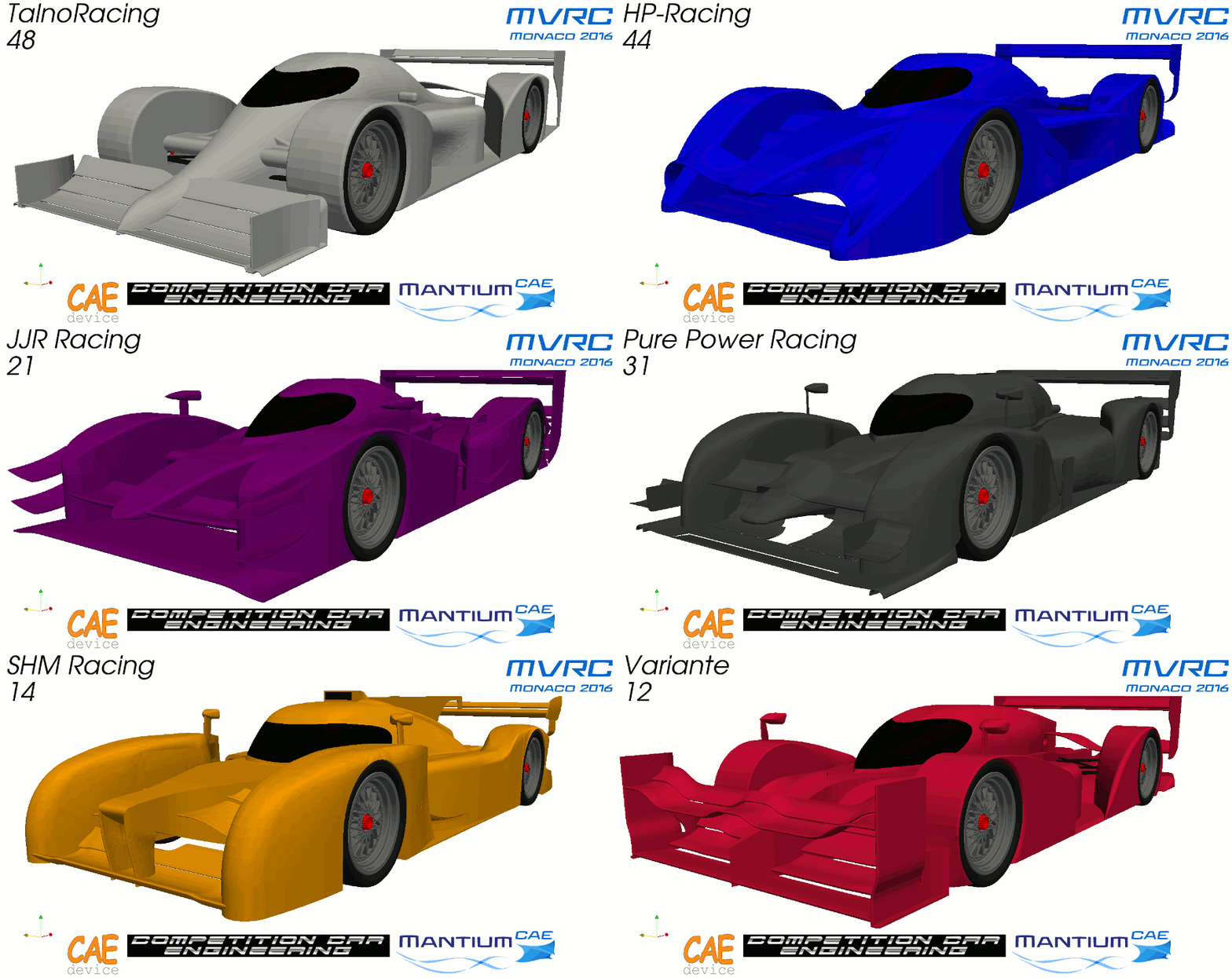
As I do not know how to add slide shows into this forum you can head over to the challenge page to see more.
http://mantiumchallenge.com/renders-monaco-2016/
Re: [MVRC] Mantium Virtual Racecar Challenge 2016
Posted: 14 Sep 2016, 12:29
by CAEdevice
If Variante's cooling devices are ok I think he will be on the top. Otherwise JJR and HP are the cars that impressed me more.
Re: [MVRC] Mantium Virtual Racecar Challenge 2016
Posted: 15 Sep 2016, 06:30
by etsmc
LVDH wrote:etsmc wrote:can someone explain the results from mantiumFlow?
really just the Cm, is this center of pressure?
I get the Cl, Cd, and Clf, Clr but id Cm is not the center of pressure how do I work this out?
also the flow for the inlet and outlets how do I make this have meaning? how do I convert the U=(numbers) to flow in I guess m/s
Another thing to add on is that once the simulation has finished how do i see the result in paraview? i can open the case.foam file but nothing shows up the box that is the wind tunnel appears to be empty.
Thanks
Hi,
have a look at the README you also have a post-processing tool. It is slightly confusing as it currently outputs the flow rates for half of the car. It does show the CoP though. The flow rate thing will be fixed soon.
In Paraview you have to select
Decomposed Case as
Case Type.
Is anyone here interested in seeing the renders of all cars?
Just read the readme and found the postprocessing tool but it does not state how to use.
so guessed that it was the same and just gave and argument of the location of the case and it works.
with the cooling flow silly question but we just double the flow for the whole car?
All the cars look great really looking forward to the finishing positions but still expecting 8th place.