Page 28 of 91
Re: [MVRC] Mantium Virtual Racecar Challenge 2016
Posted: 25 Sep 2016, 07:32
by LVDH
Do not worry about the signs on the monitoring surfaces. They depend on the orientation of the stl file you used.
Re: [MVRC] Mantium Virtual Racecar Challenge 2016
Posted: 25 Sep 2016, 12:37
by RicME85
Excellent. That clears up so much

Re: [MVRC] Mantium Virtual Racecar Challenge 2016
Posted: 25 Sep 2016, 13:53
by LVDH
If it is now clear for you that is great. But these comments and questions are all good. I will make sure to improve the software so it is more clear.
Re: [MVRC] Mantium Virtual Racecar Challenge 2016
Posted: 25 Sep 2016, 14:00
by CAEdevice
Hi LDVH, I have question about the mesh setting. I could wait tomorrow and see the the dict files but I was wondering if to define a high res surface on a specific region of the floor/diffuser would change anything or the settings for the underfloor already consider it as high res region.
Edit: I read the rulebook

and it seems that to add a high res surfaces is allowed only for wings
Re: [MVRC] Mantium Virtual Racecar Challenge 2016
Posted: 26 Sep 2016, 18:42
by variante
So, I'm trying to use WFlow.
So far I've run the test case, and I've got this:
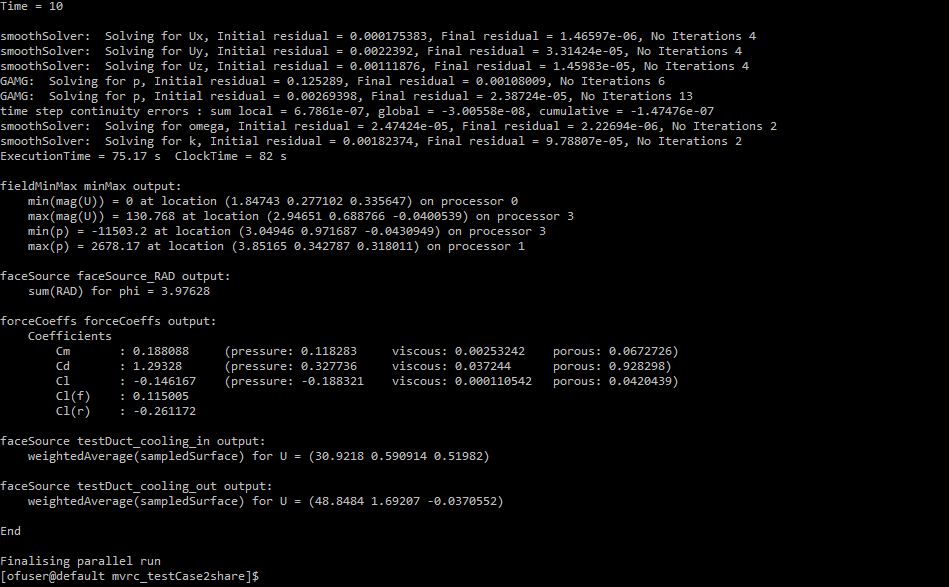
I guess the run was successful.
Now, I've got no idea how to go on and run an actual case with my car...
The "ReadMe" says that I need to "open the command window and go to the location of MantiumWFlow_MVRCed". Which command window?
Also, is there a particular location where I should place the WFlow files (such as the "shared directory" of the virtual machine)? or even the Desktop is good enough?
Sorry for these questions, but I'm a total noob with this stuff. I whish there was a step by step guide...
Re: [MVRC] Mantium Virtual Racecar Challenge 2016
Posted: 26 Sep 2016, 18:47
by CAEdevice
Hi Variante, there should be a "readme.txt" file in the WFlow package with the instruction to create a folder structure with all the STLs required by WFlow to generate the OF case.
You can find an example above (I was aswering a question by Ric) with a link to an "input_file" folder structure with the STLs of my "opensource car". I am sure you will not be too interested in the geometry

Re: [MVRC] Mantium Virtual Racecar Challenge 2016
Posted: 26 Sep 2016, 18:52
by variante
Yeah, I've got that folder structure. What shall I do with it? In other words, how do I tell WFlow to generate the OF case with those geometries?
Re: [MVRC] Mantium Virtual Racecar Challenge 2016
Posted: 26 Sep 2016, 18:52
by LVDH
OK, apparently I have to make the instructions clearer, but this will not happen the next days.
The last time I used a Windows 7 computer I hit Alt+F1 and then typed "cmd" that opened the command window. Maybe you could also navigate in the Explorer to your MantiumWFlow folder and a right click menu or something has an option like "open command window here"?
But there is a big surprise coming from HP-Racing soon that will make the work with MantiumWFlow much easier.
Re: [MVRC] Mantium Virtual Racecar Challenge 2016
Posted: 26 Sep 2016, 18:54
by CAEdevice
variante wrote:Yeah, I've got that folder structure. What shall I do with it? In other words, how do I tell WFlow to generate the OF case with those geometries?
I use a ".bat" file, but you can run it from the Windows shell with the right paths (I don't have the MVRC data with me, but I think that all is written in the txt)
Re: [MVRC] Mantium Virtual Racecar Challenge 2016
Posted: 26 Sep 2016, 18:57
by CAEdevice
LVDH wrote:But there is a big surprise coming from HP-Racing soon that will make the work with MantiumWFlow much easier.
I hope this will be the only big surprise from HP Racing. I looked at their car recently and I think that it will be a stronger opponent next race.
Re: [MVRC] Mantium Virtual Racecar Challenge 2016
Posted: 26 Sep 2016, 19:09
by variante
PS C:\Users\SANTECH> C:\Users\SANTECH\Desktop\MVRC_2016\WFLOW\WFlow\MantiumWFlow_MVRCed_win.exe
Traceback (most recent call last):
  File "<string>", line 42, in <module>
IndexError: list index out of range
MantiumWFlow_obfs returned -1
PS C:\Users\SANTECH>
Re: [MVRC] Mantium Virtual Racecar Challenge 2016
Posted: 26 Sep 2016, 19:44
by CAEdevice
Where is you "input_files" directory?
Re: [MVRC] Mantium Virtual Racecar Challenge 2016
Posted: 26 Sep 2016, 20:00
by variante
CAEdevice wrote:Where is you "input_files" directory?
Simply on the desktop. Why? Shouldn't I specify its location after opening the program?
Re: [MVRC] Mantium Virtual Racecar Challenge 2016
Posted: 26 Sep 2016, 20:32
by CAEdevice
I am relying on my memory, but:
- Assuming that "input_files" is in C:\Users\Matteo
- Assuming that WFlow executable is in C:\Users\Matteo\WFlow
I would use (more or less) this commands:
Code: Select all
cd C:\Users\Matteo\WFlow
MantiumWFlow_MVRCed_win.exe C:\Users\Matteo
(WFlow needs to know where the geometry is)
Re: [MVRC] Mantium Virtual Racecar Challenge 2016
Posted: 26 Sep 2016, 20:36
by RicME85
Needs to be in a directory that you dont need permissions for, Windows can be funny with the desktop folder.
I followed the PDF for getting the test case running so I have a folder in my C drive called CFD - c:\CFD\Ricme
Within that I then put a folder with the name of the car (as suggested in the Readme something that relates to the version) - Ricme - Car - 01
In there I have the input_files folder with the relevant folders and files within.
I have another folder called MVRC which has the MFlow files in.
To get a command window I open the directory so I can see the files 'MantiumWFlow_MVRCed_win' etc then if you hold SHIFT and RIGHT CLICK in the window it will give you the option to 'Open command window here' which will open a CMD window in that directory.
From there its easy enough to copy and paste the various commands.
Code: Select all
MantiumWFlow_MVRCed_win.exe C:\CFD\ricme\RicME_Car_01
Next its a case of running 'OpenFOAM_Start' that you got after setting up in the beginning (I put the shortcuts fr OpenFOAM in the MVRC folder for keeping things together and neat.
Code: Select all
cd workingDir
• cd Ricme - Car - 01
• bash runCase.sh
Then once done its back to the MVRC folder to open a command window again (unless you kept the first one open)
Code: Select all
MantiumWFlow_ppCase_simple_win.exe C:\CFD\ricme\RicME_Car_01