Seems like CAEdevice has the diffuser strakes detached by the main diffuser... Am I wrong?
....Well spotted....
Re: [MVRC] Mantium Virtual Racecar Challenge 2020 (Grand Prix Cars)
Posted: 01 Jul 2020, 15:29
by Koldskaal
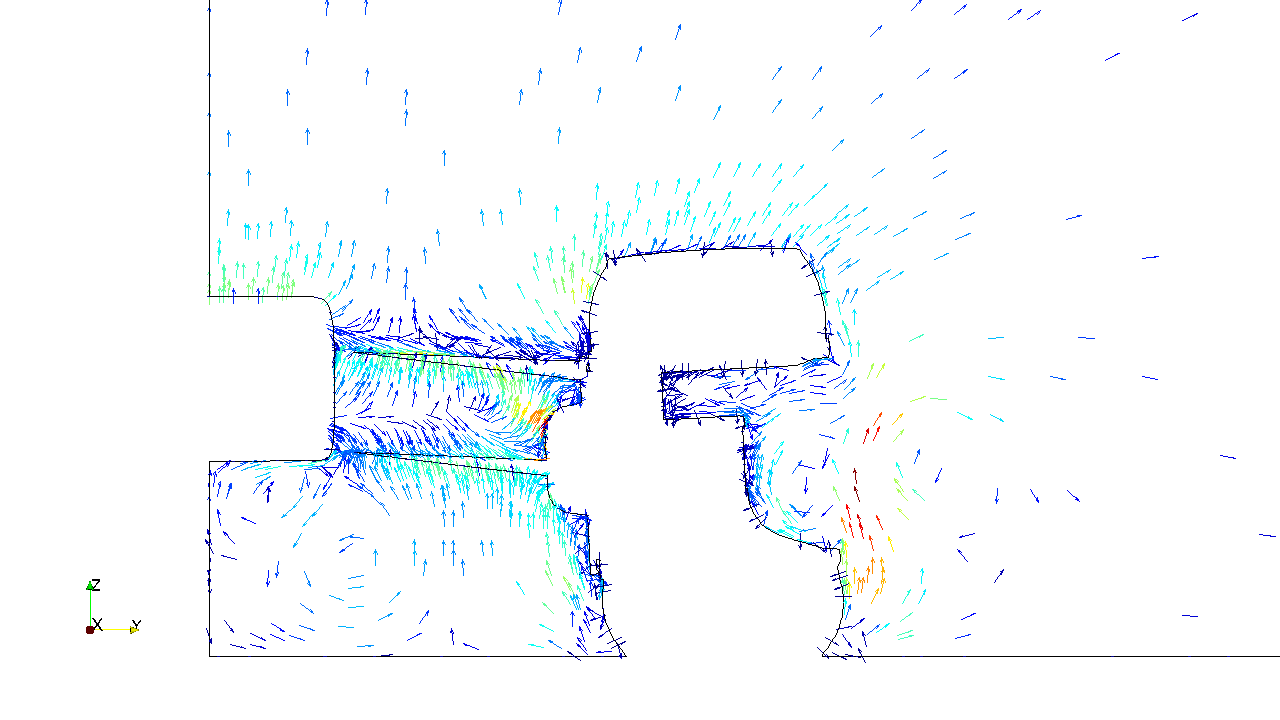
I recently rediscovered the Honda R&D 2009 technical review in a folder on my desktop. They use what is called quiver plots in matlab terminology. I dont know what else to call them, as both vector plot and vector field seem like bad names to me. I think these could be at least as powerful as LIC, so I tried recreating one in paraview:
It is a lot easier to read the rotational direction of the vorticies, which could make it easier to understand how they interact.
The geometry outline is just a slice of all the patches. The quiver plot itself is made by extracting the internal mesh applying a calculator to remove the x component of the velocity (not strictly necessary ). Then slicing using 3d glyphs as representation, orienting after the result of the calculator (direction mode), and scaling by 0.02.
It's pretty good but not perfect. Do any of you know of a way to get uniform spacing in paraview?
Maybe this would be easier to implement in mflow than LIC?
Re: [MVRC] Mantium Virtual Racecar Challenge 2020 (Grand Prix Cars)
Do any of you know of a way to get uniform spacing in paraview?
Uniform mesh.
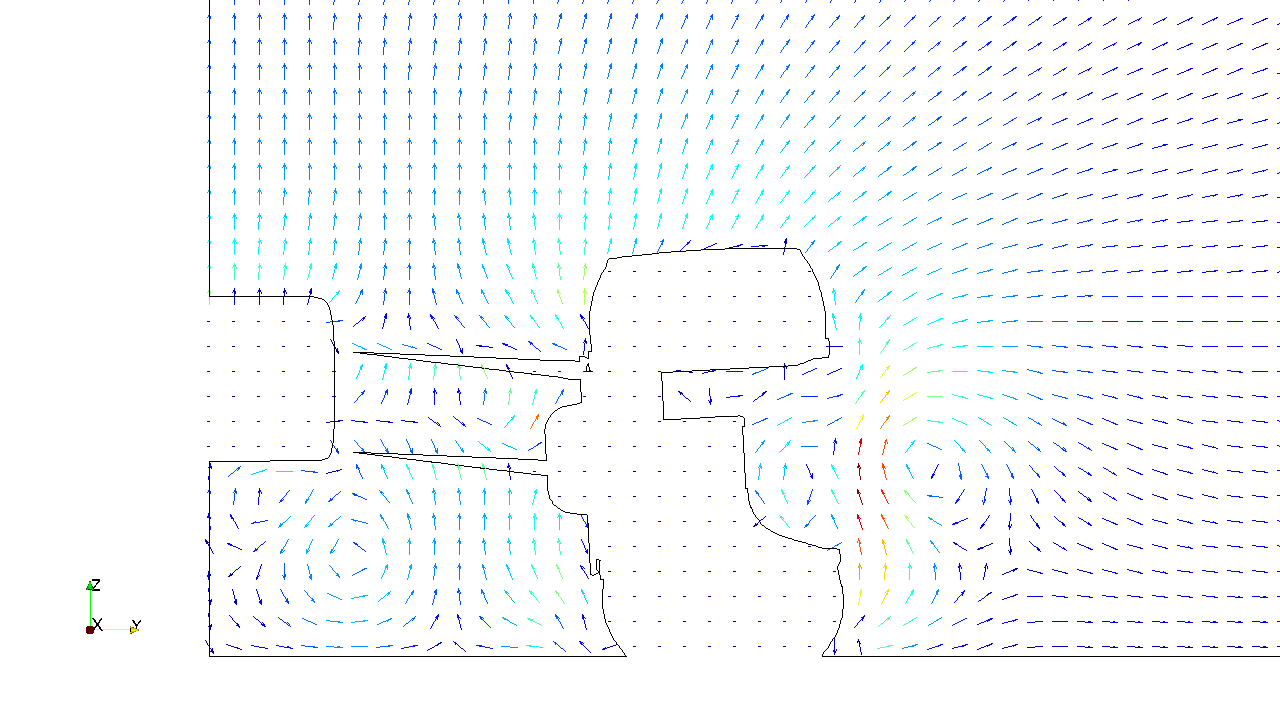
What I have done in the past iirc is to generate a plane source with the subdivisions I want for the vectors and interpolate the U field onto that plane.
Quite cumbersome.
Thomas
Re: [MVRC] Mantium Virtual Racecar Challenge 2020 (Grand Prix Cars)
Posted: 04 Jul 2020, 13:23
by MaccaRacing
Hi guys! any news about race results?
Re: [MVRC] Mantium Virtual Racecar Challenge 2020 (Grand Prix Cars)
I recently rediscovered the Honda R&D 2009 technical review in a folder on my desktop. They use what is called quiver plots in matlab terminology. I dont know what else to call them, as both vector plot and vector field seem like bad names to me. I think these could be at least as powerful as LIC, so I tried recreating one in paraview: https://i.imgur.com/xnVAfmV.png
It is a lot easier to read the rotational direction of the vorticies, which could make it easier to understand how they interact.
The geometry outline is just a slice of all the patches. The quiver plot itself is made by extracting the internal mesh applying a calculator to remove the x component of the velocity (not strictly necessary ). Then slicing using 3d glyphs as representation, orienting after the result of the calculator (direction mode), and scaling by 0.02.
It's pretty good but not perfect. Do any of you know of a way to get uniform spacing in paraview?
Maybe this would be easier to implement in mflow than LIC?
This is the workaround I have been investigating.
BTW: The uniform distribution is not exactly hidden in Paraview. It is called "Uniform Spacial Distribution". On my installation it is even the default choice.
I just came back from a very much needed vacation and am checking the results but it looks very much like you will have to enjoy the real F1 race tomorrow and wait for the MVRC results until next Sunday. I am very sorry.
Re: [MVRC] Mantium Virtual Racecar Challenge 2020 (Grand Prix Cars)
This is the workaround I have been investigating.
BTW: The uniform distribution is not exactly hidden in Paraview. It is called "Uniform Spacial Distribution". On my installation it is even the default choice.
Sure, but it is still random and driven by the seed value, afaik.
Here is the "Every nth point" with value 10. Not good for locally refined meshes, as it puts too many vectors near the walls.
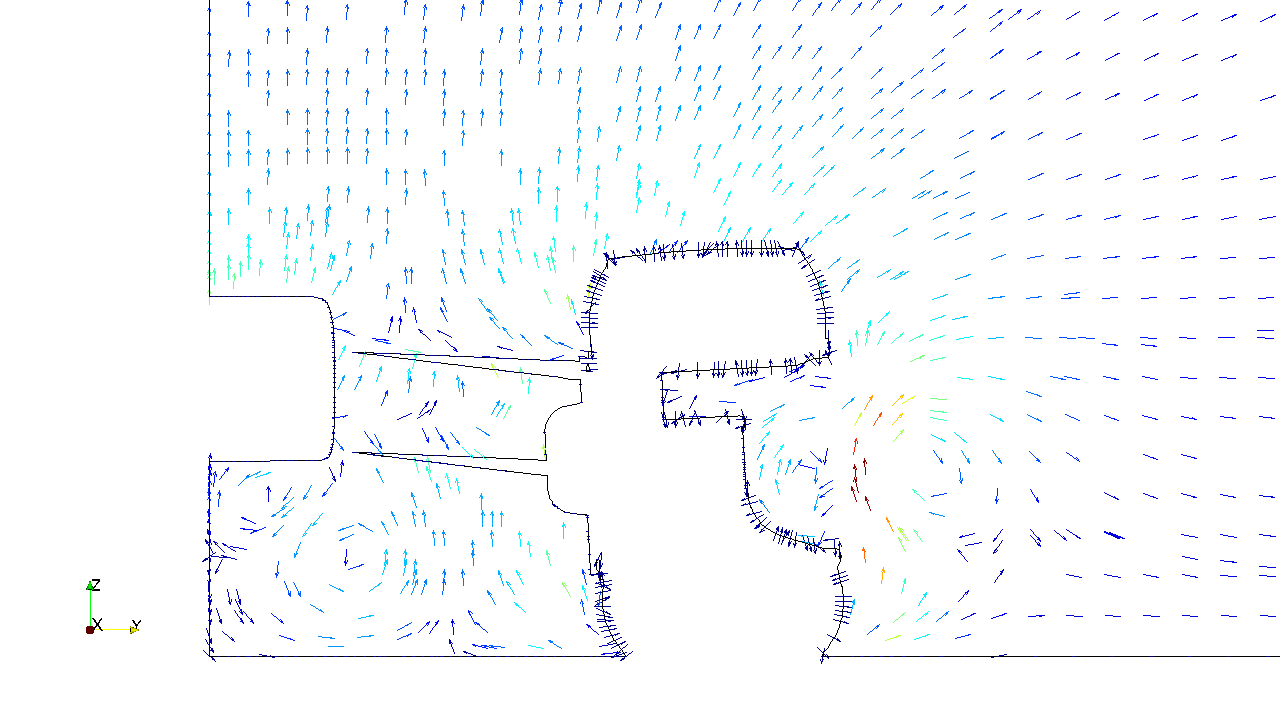
Here is the Paraview "Uniform Spatial" with some Seed number. Still a random distribution. Unless there is a trick I have not learned yet, its not really what I want.
Here is the plane - workaround. Independent of the mesh refinement.
I will post the work around in the next post.
Thomas
Re: [MVRC] Mantium Virtual Racecar Challenge 2020 (Grand Prix Cars)
Posted: 06 Jul 2020, 10:43
by Thomas2019
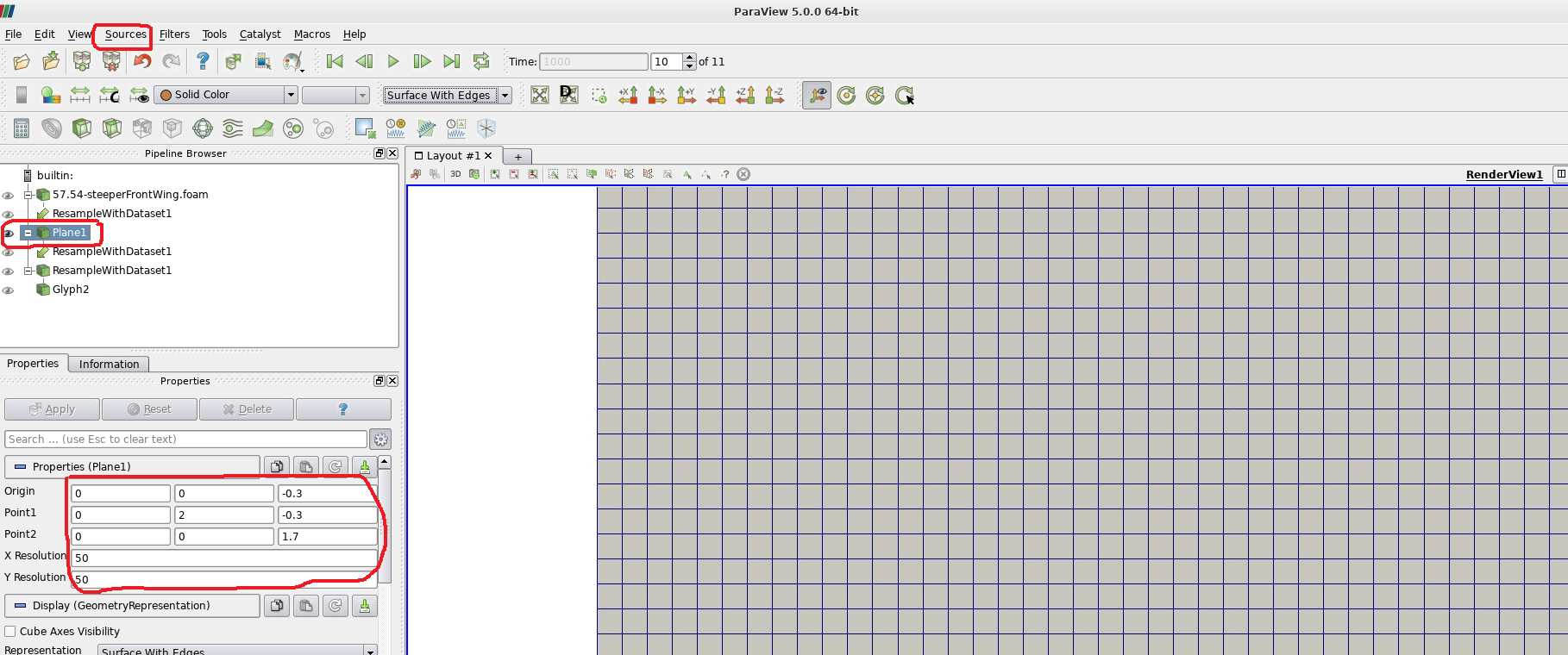
Here the Paraview pipeline for generating the uniformly distributed vectors.
Load your foam file.
Goto Sources > Plane
and generate a plane of the desired dimensions and locations. 2m x 2m at the (0 0 0) point in this case.
Use "X Resolution" and "Y Resolution" to control the number of vectors to be plotted later. Using the same number here makes sense.
Now we map the results onto this plane. Filters > Resample with Dataset
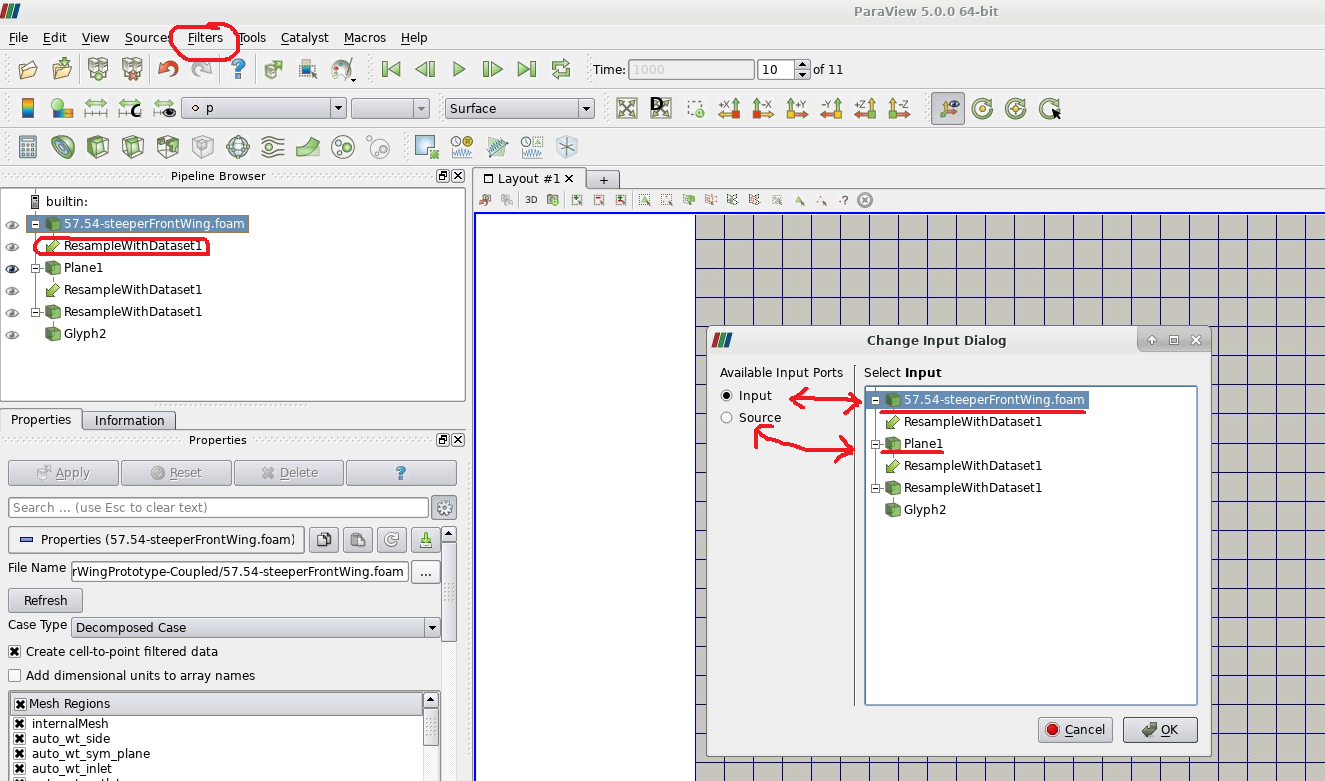
In the dialog pop up, select "Input" and click on your foam data.
Then select "Source" and click on the Plane.
Then click "Ok".
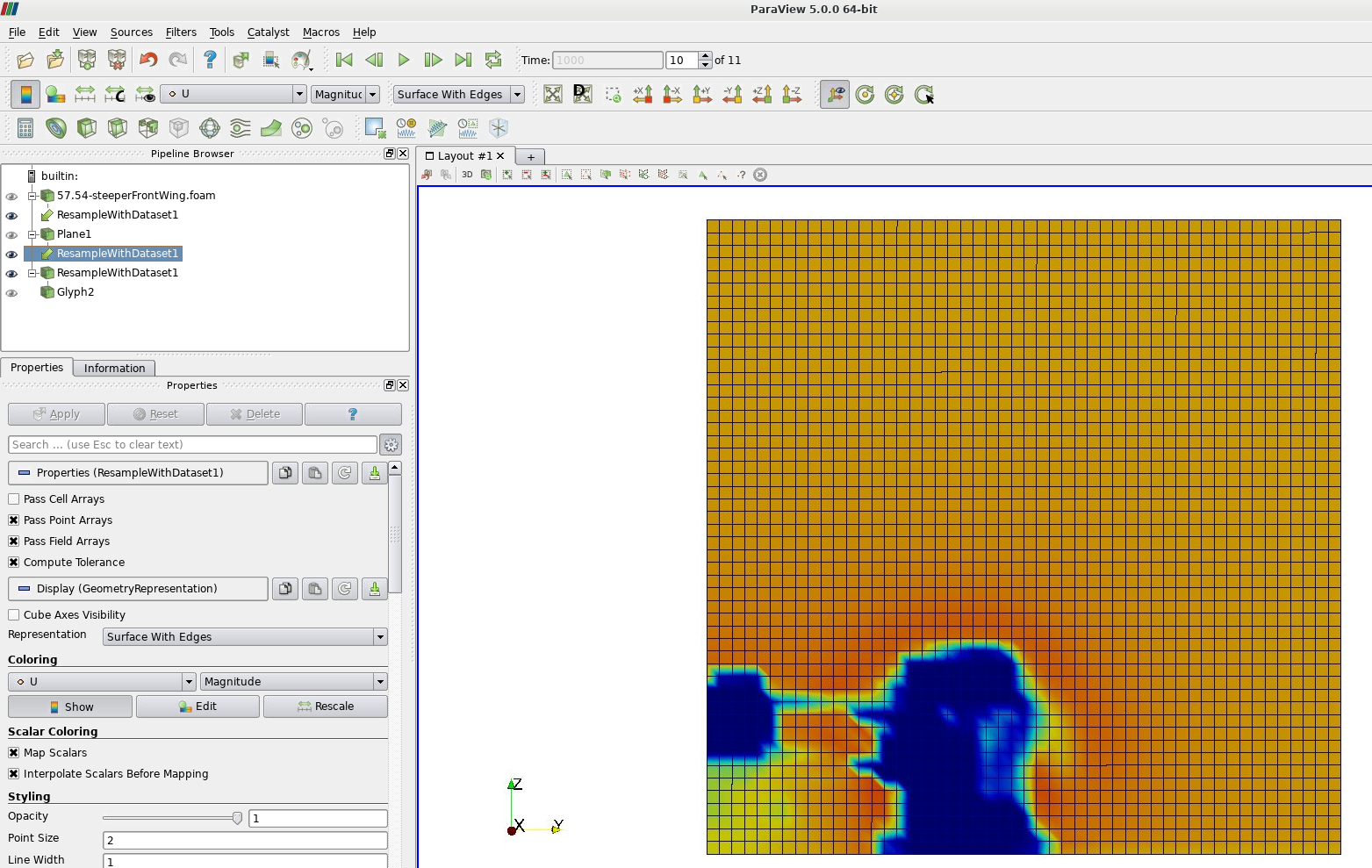
This will result in this:
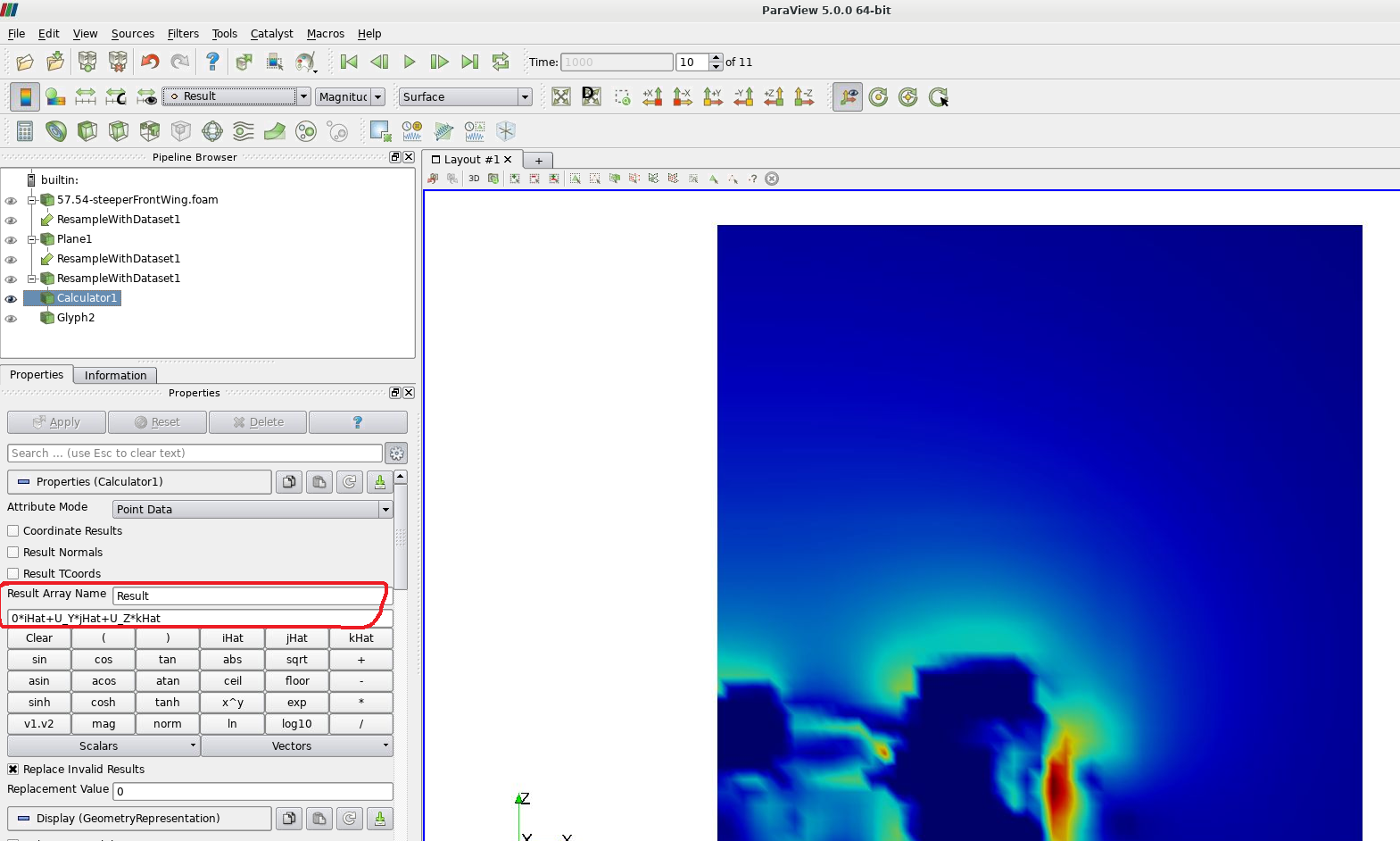
You can now for example apply the calculator as Koldskaal mentioned to get rid of the U_x component in the U vector. Note formula, how "iHat" is multiplied with "0". This is purely done to make the vectors more "visible" in a y-z section, otherwise their length would be entirely ruled by the dominating x-component.
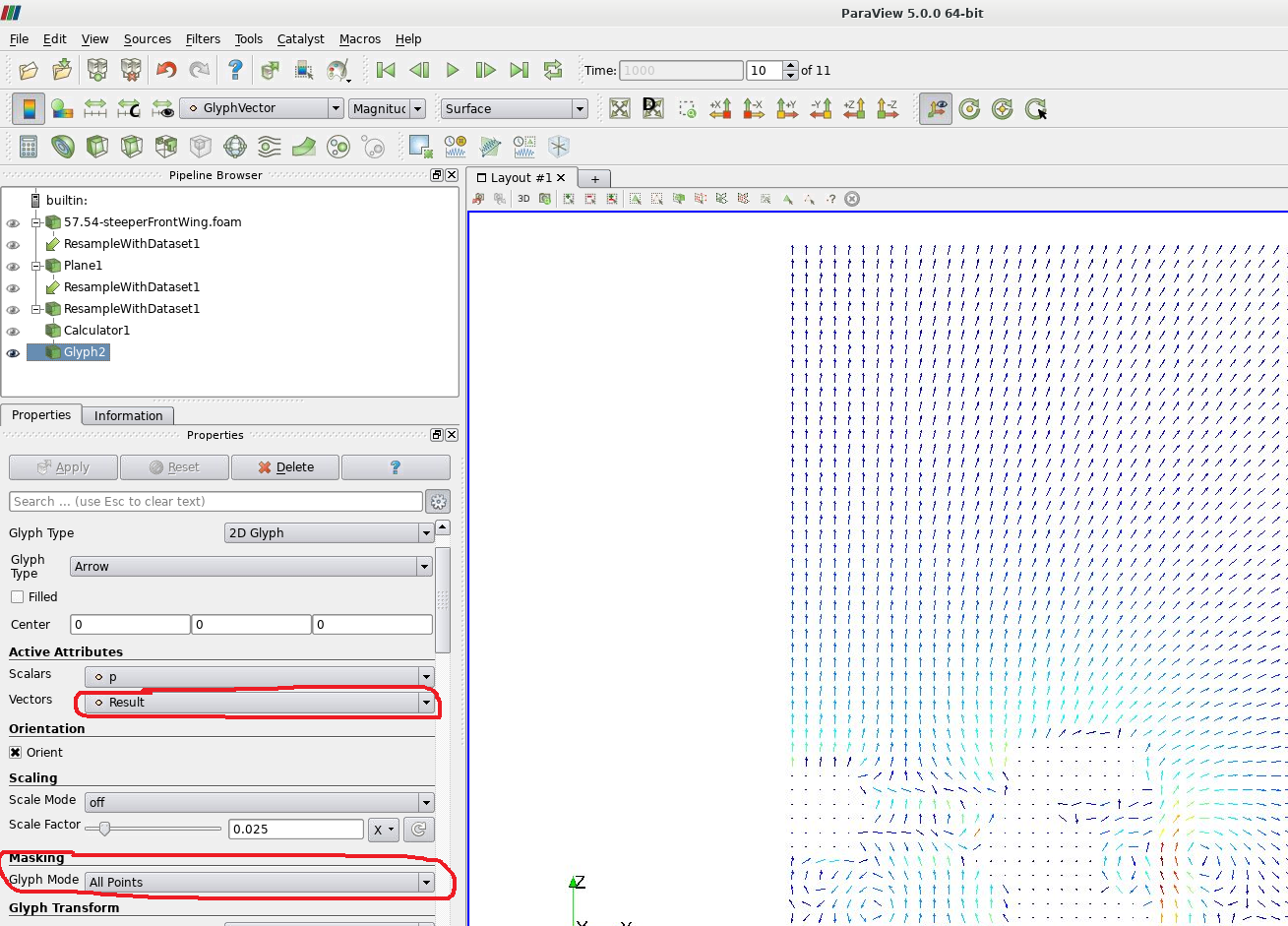
Create your "Glyph" filter on the Calculator, using the "Result" vector as an input and choose "All Points" for masking.
Play around with the X and Y Resolution on the Plane to quickly get a good looking plot.
Thomas
Re: [MVRC] Mantium Virtual Racecar Challenge 2020 (Grand Prix Cars)
Posted: 07 Jul 2020, 00:46
by Qupax
Hey everyone,
I am a high-school student (Junior, 11th grade) who just found out about this part of the forum. I am very interested in most likely going into Aerospace or Mechanical Engineering. I have always been interested in aerodynamics and would like to get involved with this. I have experience with Inventor (plus learning AutoCAD but I know that won't apply here), and I am eager to learn more as I probably don't have enough Inventor experience yet. Would anyone be willing to point me in the right direction on where to get started? I assume I missed the cutoff for this season but let me know. Also, is Inventor the preferred software or should I be using something else?
Thank you again!
Re: [MVRC] Mantium Virtual Racecar Challenge 2020 (Grand Prix Cars)
...I assume I missed the cutoff for this season but let me know. Also, is Inventor the preferred software or should I be using something else?
It isn't too late! There where a few teams that joined mid season last year, so its no big deal. In fact the next deadline is more than 6 weeks away, so that should give plenty of time to get a submission ready.
Inventor should work just fine, many of us use programs of that caliber.
Re: [MVRC] Mantium Virtual Racecar Challenge 2020 (Grand Prix Cars)
Alright, sounds good. I've been reading your INTRODUCTION TO RACECAR AERODYNAMICS as a starter lesson. Reason I am using Inventor is I get it for free through my school! I am excited to dive in and hopefully get a submission by the next race.
...I assume I missed the cutoff for this season but let me know. Also, is Inventor the preferred software or should I be using something else?
It isn't too late! There where a few teams that joined mid season last year, so its no big deal. In fact the next deadline is more than 6 weeks away, so that should give plenty of time to get a submission ready.
Inventor should work just fine, many of us use programs of that caliber.
Perfect! 6 weeks is a long time away and that really gives me enough time to hopefully throw something together.
Re: [MVRC] Mantium Virtual Racecar Challenge 2020 (Grand Prix Cars)
Posted: 11 Jul 2020, 17:22
by machin
OK, so after a week's delay we are nearly ready for round 2...
The race will be live at 13:00 CEST tomorrow on the following link: