Page 44 of 91
Re: [MVRC] Mantium Virtual Racecar Challenge 2016
Posted: 28 Oct 2016, 16:37
by LVDH
I was also disappointed to see your penalty, but it was well deserved. You were very close to a big surprise. Sunday we will see who did the best overall job.
Re: [MVRC] Mantium Virtual Racecar Challenge 2016
Posted: 28 Oct 2016, 21:31
by CAEdevice
It looks like MagnyCours race of KVRC 2014, when Variante won with an extreme low df setup.
Re: [MVRC] Mantium Virtual Racecar Challenge 2016
Posted: 29 Oct 2016, 09:03
by LVDH
Maybe while you are all waiting for the results you could all post your CAD setup and tool chain from idea to stl. There is one car in particular that has some quality issues. Maybe with your help we can help fix this car and get the quality up. This will be important for next season when we want to further improve realism and switch the second order accurate simulations.
Re: [MVRC] Mantium Virtual Racecar Challenge 2016
Posted: 29 Oct 2016, 11:37
by RicME85
Andre - did my heat exchangers and monitoring surface come out ok? I tried to increase the amount of triangles after seeing the analysis you posted on how the flow result can change depending on traingulation
Re: [MVRC] Mantium Virtual Racecar Challenge 2016
Posted: 29 Oct 2016, 12:12
by Alonso Fan
Is the my car of bad quality?
Re: [MVRC] Mantium Virtual Racecar Challenge 2016
Posted: 29 Oct 2016, 12:28
by CAEdevice
My typical tool-chain is Solidworks (I have an assembly with all the templates and ruled components where I place the "body" of the car to do the rule check) directly converted to STL.
I have some automated checks about the minimum areas and I occasionaly have an intermediate processing from SWX (exporting a STEP) to a very very old release (2008) of SpaceClaim. I use it only when I have to divide the original step in parts (in SpaceClaim you can easily transform a part into an assembly). STL export is very good for both SWX and SC.
The new car (that will probably never race this year) would have been modeled with Creo 3.0 but I haven't had the time to develop it.
I don't use any "STL restructuring" tools (if the CAD can't produce a good mesh there is not much to do), with the exception of MeshLAB to reduce the number of triangles, but not very often and always as very last step.
Re: [MVRC] Mantium Virtual Racecar Challenge 2016
Posted: 29 Oct 2016, 13:03
by LVDH
RicME85 wrote:Andre - did my heat exchangers and monitoring surface come out ok? I tried to increase the amount of triangles after seeing the analysis you posted on how the flow result can change depending on traingulation
Yes, you car was good. I am not sure if it was yours where I refined the HX monitoring surface once more with a one click operation. Last race your CAD was not so good, I still owe you a separate email about it.
Alonso Fan wrote:Is the my car of bad quality?
I am not sure, your car is still not back from its lap. Where did you find your driver? Does he take coffee breaks or something during racing?
Re: [MVRC] Mantium Virtual Racecar Challenge 2016
Posted: 29 Oct 2016, 13:25
by Alonso Fan
He sure does!

Re: [MVRC] Mantium Virtual Racecar Challenge 2016
Posted: 29 Oct 2016, 13:37
by CAEdevice
If is name is Fernando, maybe he is sunbathing
Re: [MVRC] Mantium Virtual Racecar Challenge 2016
Posted: 29 Oct 2016, 16:38
by LVDH
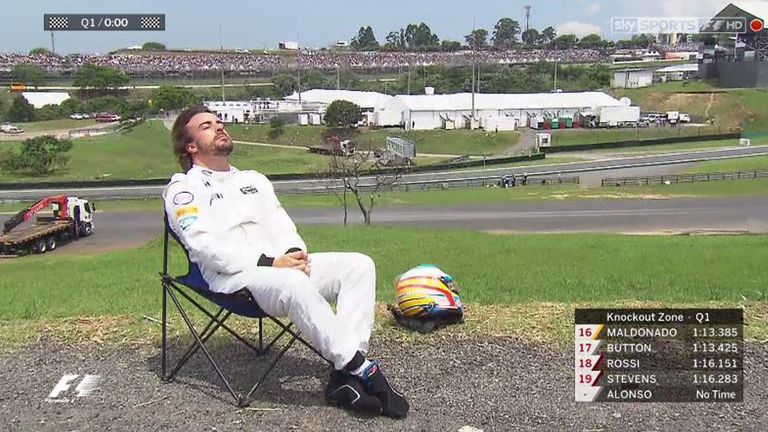
Lets hope the truck in the back ground is not waiting for an orange car, it has still not arrived.
Re: [MVRC] Mantium Virtual Racecar Challenge 2016
Posted: 29 Oct 2016, 17:35
by Ft5fTL
I had some issues with the HX surfaces so it is probably my car (i think my car has a ok quality on surfaces tho). Im finally able to use the mflow for testing so i think i fixed the issues for the next races.
About my setup; i'm not an engineer so i dont have access to any CAD tools. I tried some free CAD software but didnt had any time for learn them properly. I'm using 3ds max with nurbs modifier to create surfaces. After that i use ProBoolean for wheel arches.
Re: [MVRC] Mantium Virtual Racecar Challenge 2016
Posted: 29 Oct 2016, 18:03
by Alonso Fan
Oh dear...
Re: [MVRC] Mantium Virtual Racecar Challenge 2016
Posted: 30 Oct 2016, 09:56
by CAEdevice
Ft5fTL wrote:I'm using 3ds max with nurbs modifier to create surfaces. After that i use ProBoolean for wheel arches.
If you can handle UV surfaces, the ability to use 3ds would be useful for my project to bring CFD races to a driving simulator (cars with the same engine and sospensions, CFD imported from WFlow results, customizable AI).
The project has not been updated after the test I have dobe with my 2015 car.
https://www.dropbox.com/s/ezx4a3xji95n3 ... 1.mp4?dl=0
Re: [MVRC] Mantium Virtual Racecar Challenge 2016
Posted: 30 Oct 2016, 12:11
by Alonso Fan
CAEdevice wrote:Ft5fTL wrote:I'm using 3ds max with nurbs modifier to create surfaces. After that i use ProBoolean for wheel arches.
If you can handle UV surfaces, the ability to use 3ds would be useful for my project to bring CFD races to a driving simulator (cars with the same engine and sospensions, CFD imported from WFlow results, customizable AI).
The project has not been updated after the test I have dobe with my 2015 car.
https://www.dropbox.com/s/ezx4a3xji95n3 ... 1.mp4?dl=0
hah your project but partly my idea
anyway, i'm using Sketchup for car design, (mainly curviloft) exporting to .stl with a sketchup plugin, if the .stl is too large then I import it into paraview and decimate it, usually gives good results.
in the future, like, when I have more than 10 spare minutes in my life, I plan to replace sketchup with maybe blender
Re: [MVRC] Mantium Virtual Racecar Challenge 2016
Posted: 30 Oct 2016, 12:26
by CAEdevice
Alonso Fan wrote:CAEdevice wrote:Ft5fTL wrote:I'm using 3ds max with nurbs modifier to create surfaces. After that i use ProBoolean for wheel arches.
If you can handle UV surfaces, the ability to use 3ds would be useful for my project to bring CFD races to a driving simulator (cars with the same engine and sospensions, CFD imported from WFlow results, customizable AI).
The project has not been updated after the test I have dobe with my 2015 car.
https://www.dropbox.com/s/ezx4a3xji95n3 ... 1.mp4?dl=0
hah your project but partly my idea
anyway, i'm using Sketchup for car design, (mainly curviloft) exporting to .stl with a sketchup plugin, if the .stl is too large then I import it into paraview and decimate it, usually gives good results.
in the future, like, when I have more than 10 spare minutes in my life, I plan to replace sketchup with maybe blender
You can consider the original idea 100% as yours, I don't believe in I.P.

The problem is to realise it!