Page 6 of 8
Re: My F1 Car - Jordan GP
Posted: 23 Feb 2011, 01:41
by horse
No, I can't fault it on second thoughts, either. I thought maybe the crash structure regs might come into play, but they only hold for the actual crash tested part.
What has stopped these winglets appearing on the current crop of F1 cars?
Re: My F1 Car - Jordan GP
Posted: 23 Feb 2011, 23:48
by jordangp
Yeah I was wondering that, but the Toro Ross have used the central 150mm of the diffuser like this theres a couple of pics of that, so I don't know really :/
Re: My F1 Car - Jordan GP
Posted: 01 Mar 2011, 17:29
by sh1111
Hi, may I know where can find out the detail dimension of F1 car?
Re: My F1 Car - Jordan GP
Posted: 01 Mar 2011, 17:56
by Tozza Mazza
sh1111 wrote:Hi, may I know where can find out the detail dimension of F1 car?
Go to the F1 website and look at the regulations. They have them in technical and non technical terms, but that would be the best place to take a look.
the height of an F1 car is 950mm from the referance plane, the width is 1800mm (tyres and front wing), 1400mm max between the front and rear wheel centre lines, and 1000mm max behind the rear wheel centre line, rear wing is 750mm wide. Wheelbase is around 3300mm, but varies betweens car.
Hope i could help
TM
Re: My F1 Car - Jordan GP
Posted: 09 Mar 2011, 21:34
by SEBA_406
I have a little question, I don´t know what software you are using to make this model, I´m actually using SolidWorks for my designs. How do you draw the "gills" in the endplates of the rear wing?? (I don´t know if that the appropiate name). I mean, do you make it using a solid extrude or something like that??
Re: My F1 Car - Jordan GP
Posted: 09 Mar 2011, 21:38
by SEBA_406
sh1111 wrote:Hi, may I know where can find out the detail dimension of F1 car?
This maybe help you...
http://www.f1technical.net/articles/11634
Help me a lot!!!
Best regards!
Re: My F1 Car - Jordan GP
Posted: 10 Mar 2011, 07:04
by elitewolverine
Hey there nice model, especially in sketchup...
but i must direct you to a better FREE modeling program, its really worth it to learn, really really worth it.
plus it has its own rendering, animation, and rig support system...
http://www.blender.org oh make sure you download 2.56 version, its a major change from the 2.4 versions, especially the interface.
just like any program it will take some time, but trust me, you can pull off a model like yours in less than a week. heck i would go out on a limb and say 2days...
Re: My F1 Car - Jordan GP
Posted: 10 Mar 2011, 08:52
by machin
@ Elitewolverine:
I use Blender to render my model (
viewtopic.php?f=1&t=7917&start=75), but personally I don't think its that great for actually making the model in the first place... for that I use Solidworks... Solidworks is a proper engineering package and therefore makes it easier to make changes quickly as well as being able to do things like apply a density to each part to obtain a CG, etc......
Havnig said that, Solidworks isn't free...
Re: My F1 Car - Jordan GP
Posted: 10 Mar 2011, 20:02
by elitewolverine
machin wrote:@ Elitewolverine:
I use Blender to render my model (
viewtopic.php?f=1&t=7917&start=75), but personally I don't think its that great for actually making the model in the first place... for that I use Solidworks... Solidworks is a proper engineering package and therefore makes it easier to make changes quickly as well as being able to do things like apply a density to each part to obtain a CG, etc......
Havnig said that, Solidworks isn't free...
man you need to adjust your rendering settings...it would make it tons nicer...
try this, i am using 2.56 right now
go to your world tab, select ambient occlusion, factor .5 and setting multiply.
select enviorment lighting energy .75, and setting sky color (i use a dark grey for my color)
and under gather, use raytrace, distance of 2m, and 12 samples. You can use approximate and its tons tons faster, but raytrace is nicer
as well, blenders new modifer stack allows you to now 'solidify', and create thickness, control by vertex groups, etc. Now i know its a far cry from solidworks (dabled in solids works abit)...
but you said it best, it aint free, nor can solidworks run off a thumb drive and require like 20mb to install...

Re: My F1 Car - Jordan GP
Posted: 10 Mar 2011, 23:26
by jordangp
Havn't updated in a while, because I updated early for this current Catalunya test, so I thoguht I'd share a preview of what to expect for my MAJOR upgarde for Melbourne.
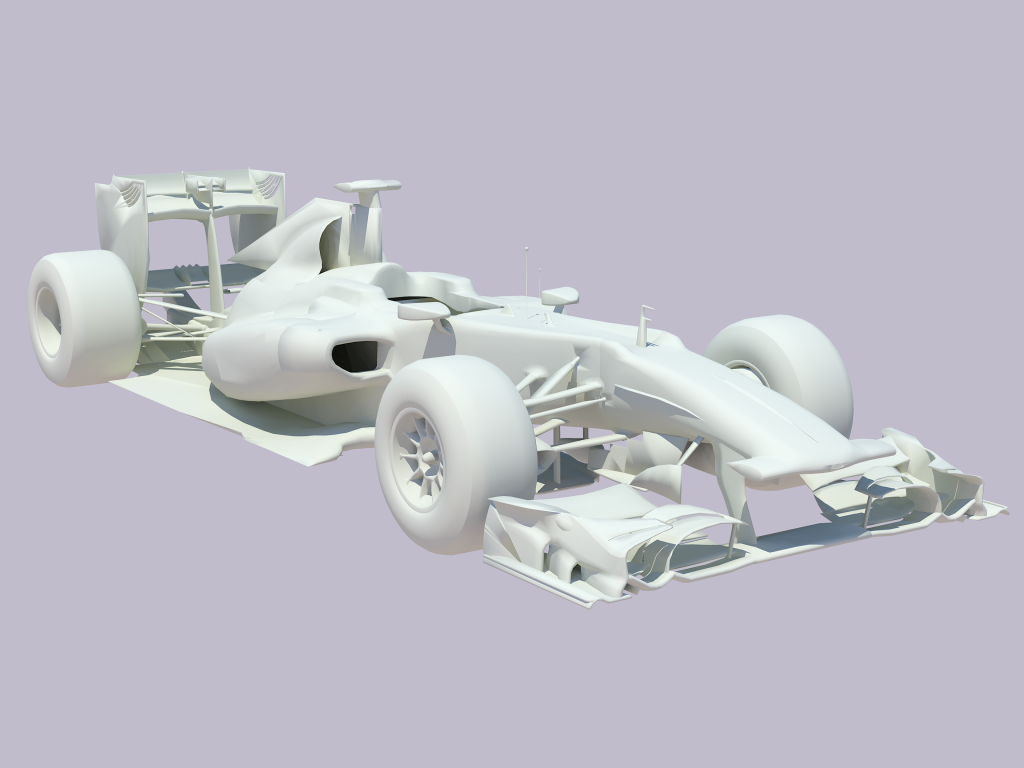
A lot of work to do regarding, floor, exhausts, airbox, cooling, diffuser bargeboards etc. but what do you guys think? Do you think I'm going in the right direction of development?
Re: My F1 Car - Jordan GP
Posted: 14 Mar 2011, 22:30
by machin
Lets continue this here:
viewtopic.php?f=1&t=7917&start=75
rather than hi-jack this thread (Great looking car by the way Jordan)....
Re: My F1 Car - Jordan GP
Posted: 20 Mar 2011, 18:32
by jamesrance11
how did you make the middle section of your car? like the side pods etc
Re: My F1 Car - Jordan GP
Posted: 20 Mar 2011, 22:30
by jordangp
Well it depends on what software you are using on how much I can help you with that. I use Google Sketchup, which is a very different method as used by most people and probably you.
Re: My F1 Car - Jordan GP
Posted: 20 Mar 2011, 23:38
by jamesrance11
im using google sketch up as well
Re: My F1 Car - Jordan GP
Posted: 21 Mar 2011, 23:00
by jordangp
Well create a basic frame for where eveything shanges hape, or goes a different way, with the curve tool, then fill it all in with the line tool. the closer the frame is then the more dtailed the design.